

How to set SMART Goals for 2026!
By: Jessica Hrdlicka MS, RD, LD/N, CDCES

Managing diabetes is a long-term commitment, and the start of a new year is an ideal time to reset, refocus, and create goals that are both realistic and motivating. One of the most effective ways to do this is by using the SMART goal framework. SMART goals help turn good intentions into clear, actionable plans that support better blood sugar control, healthier habits, and improved quality of life.
What Are SMART Goals?
SMART is an acronym that stands for:
- Specific – Clearly define what you want to achieve
- Measurable – Include criteria to track progress
- Achievable – Set goals that are realistic for your lifestyle
- Relevant – Align goals with your health priorities
- Time-bound – Set a clear timeframe
When applied to diabetes management, SMART goals can reduce overwhelm and help you focus on sustainable changes rather than perfection.
Why SMART Goals Matter in Diabetes Care
Diabetes management often involves multiple daily decisions—food choices, activity, monitoring, medication adherence, and stress management. Vague goals like “eat better” or “exercise more” can feel discouraging because they lack clarity. SMART goals provide structure, making it easier to track progress, celebrate small wins, and adjust when life gets busy.
How to Create SMART Goals for Diabetes Management
1. Make Your Goal Specific
Instead of setting a broad goal, narrow it down.
- Not specific: “I want to improve my blood sugar.”
- Specific: “I will check my blood glucose before breakfast at least five days a week.”
Specific goals eliminate guesswork and make it easier to take action.
2. Ensure Your Goal Is Measurable
Measurement allows you to see progress over time and identify patterns.
- Examples of measurable elements include frequency, duration, or numerical targets.
- Use tools like glucose logs, apps, or journals to track consistency rather than perfection.
For example, tracking how often you walk each week or how consistently you log meals can be just as important as the numbers themselves.
3. Keep Goals Achievable
Ambitious goals can be motivating, but unrealistic ones often lead to burnout.
- If you’re currently inactive, committing to daily intense workouts may not be sustainable.
- Start small and build gradually, allowing your routine to evolve over time.
An achievable goal might be committing to short walks after meals instead of long gym sessions.
4. Make Sure the Goal Is Relevant
Your goals should reflect what matters most to you in 2026.
Ask yourself:
- Does this goal support my overall health?
- Will it help me feel more confident managing my diabetes?
- Does it fit my work, family, and lifestyle commitments?
Relevance increases motivation and helps goals feel meaningful rather than like chores.
5. Set a Time Frame
A time-bound goal creates urgency and encourages follow-through.
- Short-term goals (weekly or monthly) help build momentum.
- Longer-term goals can focus on habits you want to maintain throughout the year.
For example, you might set a goal to practice consistent meal planning for the next 30 days, then reassess.
Examples of SMART Diabetes Goals for 2026
- Nutrition: “I will prepare balanced lunches at home at least four days a week for the next two months.”
- Physical activity: “I will take a 20-minute walk after dinner three times a week through March.”
- Monitoring: “I will log my blood glucose readings in my app at least five days per week for the next six weeks.”
- Education: “I will attend one diabetes education session or webinar by the end of the first quarter of 2026.”
- Stress management: “I will practice a 5-minute breathing or mindfulness exercise four evenings per week for the next month.”
Reviewing and Adjusting Your Goals
SMART goals are not meant to be rigid. Life changes, and your goals should be flexible enough to change with it.
- Review progress regularly—monthly or quarterly works well.
- Adjust goals if they feel too easy or too demanding.
- Focus on trends and habits rather than isolated setbacks.
Remember, progress in diabetes management is not about being perfect—it’s about being consistent.
Moving Forward in 2026
Setting SMART goals empowers you to take control of your diabetes one step at a time. By focusing on clear, realistic, and meaningful goals, you can build habits that support better health throughout 2026 and beyond. Celebrate small victories, learn from challenges, and keep your goals aligned with the life you want to live.
For more information on diabetes management, chronic kidney disease, weight loss, or nutrition education please call 561-659-6336 ext 8012 to schedule an appointment today. Please enjoy our December 2025 Living Well with Diabetes Newsletter
Understanding Sensor Glucose vs. Blood Glucose
By: Jessica Hrdlicka MS, RD, LD/N, CDCES
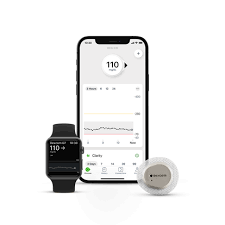
Continuous glucose monitors (CGMs) like the Dexcom G7 and FreeStyle Libre 3 Plus have transformed diabetes care by giving real-time glucose trends throughout the day. But their readings are not the same as fingerstick blood glucose values, and understanding why helps you manage your diabetes more safely and confidently.
1. What Each Technology Actually Measures
- Blood Glucose (Fingerstick):
A traditional blood glucose meter measures the glucose in your bloodstream from a drop of blood. This is considered the most direct indicator of your current glucose level and is typically used as the “reference” in clinical settings. - Sensor Glucose (CGM):
Both Dexcom G7 and FreeStyle Libre sensors measure glucose in the interstitial fluid — the fluid that surrounds cells under your skin. CGMs use a tiny filament inserted under the skin to detect glucose and transmit values to your smartphone or receiver.
2. Why the Numbers Can Be Different
These differences exist for a few key reasons:
Physiological Lag Time
Glucose takes a short time to move from the bloodstream into the interstitial fluid. When blood glucose is changing rapidly — after meals, exercise, or insulin doses — sensor readings can trail behind fingerstick values by 5–20 minutes or more.
Different Measurement Sites
Because blood and interstitial fluid are not the same compartment, the two measurements naturally vary — especially when glucose is rising or falling quickly. When glucose is rising, CGM may read lower than a fingerstick; when glucose is falling, it may read higher.
Accuracy Ranges
CGMs are highly accurate but have a built-in tolerance. It’s normal for sensor readings to be within about ±20% of a blood glucose meter at higher glucose levels; at lower levels, the acceptable difference is proportionally narrower.
Dexcom G7 & FreeStyle Libre 3 Plus: What’s Similar (and Different)
Both systems rely on interstitial glucose, but they have some practical differences in performance and use:
Dexcom G7
- Uses an algorithm that can accept optional calibration with a fingerstick value to improve alignment with blood glucose.
- Typical accuracy (measured by mean absolute relative difference, MARD) is around ~8% in clinical testing, which is a strong accuracy metric for CGMs.
FreeStyle Libre 3 Plus
- Factory-calibrated and generally doesn’t require user calibration.
- Reads every minute, which gives very frequent updates.
- Users should be aware of real-world reports and regulatory alerts.
When the Numbers Don’t Match — What to Do
Discrepancies between sensor glucose and fingerstick blood glucose are common. Here’s a practical approach when you see a mismatch:
1. Trust Your Symptoms
If your body feels low (shaky, sweaty, confused) but your CGM doesn’t show a low, or vice versa, perform a fingerstick test before treating. Symptoms are a crucial clue.
2. Use Fingerstick Values for Treatment Decisions
When readings differ significantly (outside expected tolerance), use the fingerstick blood glucose value to decide on carbohydrate intake, insulin dose, or other treatment steps.
3. Check Sensor Conditions
- Was the sensor just applied (first 12–24 hours)? Sensors are sometimes less accurate during initial wear.
- Is there pressure on the sensor (e.g., lying on it while sleeping)? This can cause temporary “compression lows.”
4. Consider Calibration (Dexcom Only)
If your Dexcom G7 is consistently off for hours and glucose is stable, optional calibration with a good fingerstick value may help bring readings closer.
5. Confirm Accuracy and Device Alerts
With systems like Libre 3 Plus that typically don’t allow user calibration, trust the sensor most of the time — but if a sensor is suspected to be faulty (persistent large differences), stop use and contact the manufacturer or healthcare provider. This is especially important given recent device corrections advising users to rely on blood glucose meters when sensor readings don’t align or when devices are part of affected lots.
Summary
Feature | Blood Glucose Meter | CGM (G7 / Libre 3 Plus) |
What it measures | Glucose in blood | Glucose in interstitial fluid |
Frequency | Once per test | Continuous (every 1–5 min) |
Delay / Lag | None | Potential 5–20 min lag |
Best for | Treatment decisions when in doubt | Trend and pattern monitoring |
Understanding why CGM and fingerstick readings differ — and how to handle those differences — helps you make safer, smarter diabetes management decisions every day.
Disclaimer: This article is educational and not medical advice. Always follow your healthcare provider’s guidance for treatment decisions.
If you would like more information about diabetes management, glucose monitoring, diabetes nutrition, heart-healthy or kidney-friendly meal ideas please call our office to schedule a consult with one of our Certified Diabetes Care and Education Specialists at 561-659-6336 ext 8012.
Healthy Meal Planning Class & Pre-Diabetes Sessions are available! Join our classes to stay motivated in 2026 & feel great!

Healthy Holiday Meal Planning & Weight Loss Class
West Palm Beach Location (Virtual or In Person!)
Temple Israel 1901 N. Flagler Drive
West Palm Beach, FL 33401
Tuesday, February 10th 10am-12pm
Boynton Beach Location
6056 Boynton Beach Blvd.
Boynton Beach, FL 33437
Tuesday, January 20th 10am-12pm
Pre-Diabetes Class
West Palm Beach Location (Virtual or In Person!)
Temple Israel 1901 N. Flagler Drive
West Palm Beach, FL 33401
Tuesday, January 20th 10am-12pm
If interested in attending this program please contact our scheduling department at (561) 659-6336 Extension 8012 today!
At Healthy Living with Diabetes we want to ensure that you are satisfied with all services received. We also would like your input on educational workshops that you would like us to offer, information you would like to read about in Healthy Living with Diabetes Monthly, or feedback on any workshop that you may have attended. You can contact the director of education personally by email jcook@PBDES.COM or leave a message at (561) 659-6336 ext. 8012. We would love to hear from you!
Check us out on the web!

 www.palmbeachdiabetes.com